
As with all themes in general, updates are regular and very important.
In the updates, features, functionalities are added, and errors are fixed, compatibility with WordPress and 3rd party plugins is maintained, that’s why you always have to keep our theme up to date.
In this post we are going to explain how to create a Divi API Key, in the Elegant Themes page.
It is always recommended to make a backup before updating, in order to revert the changes in case something goes wrong.
We have to know that, when updating Divi, or any theme, if we have modified any PHP or CSS file, this update will erase the changes.
For this reason, whenever we want to modify Divi, we create a Child Theme.
How To Create A Divi API Key
To update Divi, you must have an active subscription.
Now we are going to generate a Divi API Key, since it will be the way that Divi has to be updated.
To know that in our installation we have a subscription of divi, when updating, we communicate with Elegant Themes and through our username and API Key, it is confirmed.
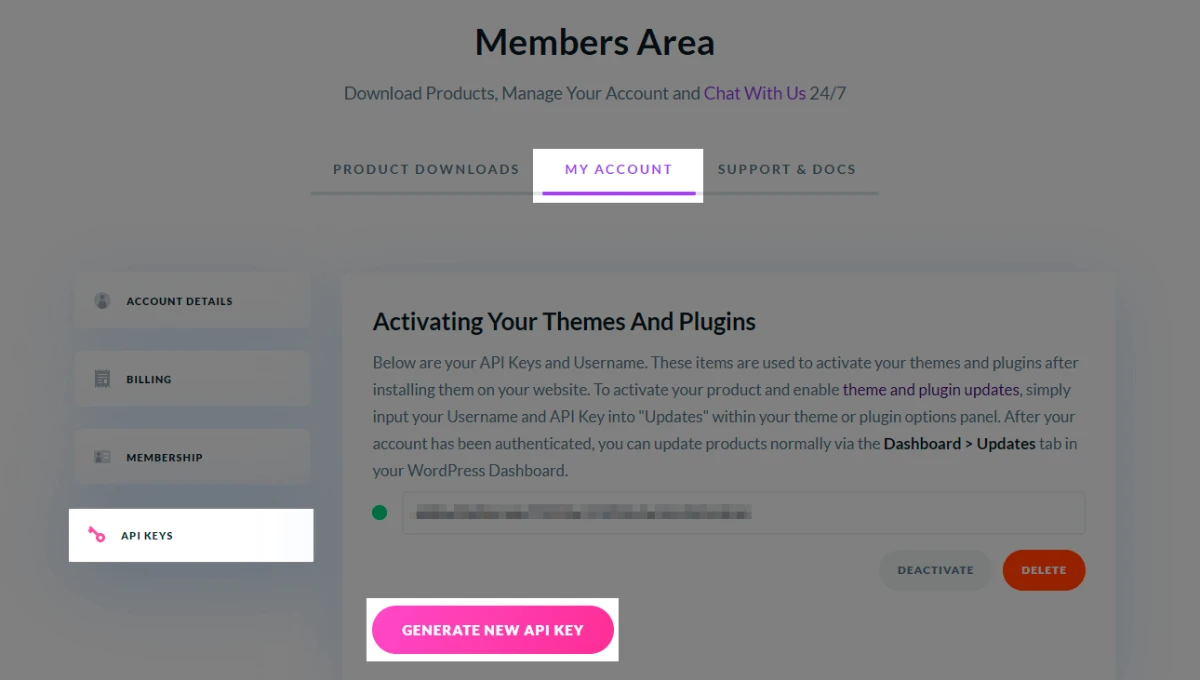
We enter the page elegantthemes.com, and we go to the section Members Area → My Account → Api Keys, and click on “Generate New Apy Key” button.
Now we copy the Api Key that it has generated for us. As a tip, add a label for reference, since we can have more than one Key, and thus we can identify them.
We also have the option to disable or delete an API Key.
In our WordPress dashboard, we go to Divi → Theme Options → Update. There we will introduce the Elegant Themes username, and our API Key.
To continue with our update, visit our post, How To Update Divi.
Divi usually has frequent updates, so we recommend keeping up to date with Elegant Themes.
In addition to the Divi Theme, it includes the “Extra” Theme magazine, and the Divi Builder, Monarch and Bloom plugins, with their respective updates.
Steps in Short
- Log in to your Elegant Themes account and open Members Area → My Account → API Keys.
- Click Generate New API Key and give it a label so you can recognize it later.
- Copy the key.
- In WordPress, go to Divi → Theme Options → Updates.
- Enter your Elegant Themes username and paste the API key, then save.
Troubleshooting
- Invalid username or API key: check that the username is the one from your Elegant Themes account and that the key was pasted without extra spaces at the beginning or end.
- No updates appear: your subscription must be active. If it has expired, renew it before trying again.
- You regenerated or deleted a key: the old key stops working, so update it in Divi Theme Options.
- You use Divi on several sites: you can create more than one key, which is why the label is useful.
Keep Your API Key Private
Treat the API key like a password. Do not share it publicly or leave it visible in screenshots. If you think someone else has seen it, delete it in your Elegant Themes account and generate a new one.
Working with Divi? Explore our Divi child themes to get a head start on your design. You may also like: How To Update Divi.
Leave a Reply