
Google Fonts has a huge serif section, and most of it is free to use on any website, no license to buy, no account needed. The hard part is not availability, it is picking one that fits the project and knowing how to use it well. Below are ten serif fonts worth knowing, from the display faces everyone is using on landing pages right now to a couple of steady, reliable text fonts for long articles.
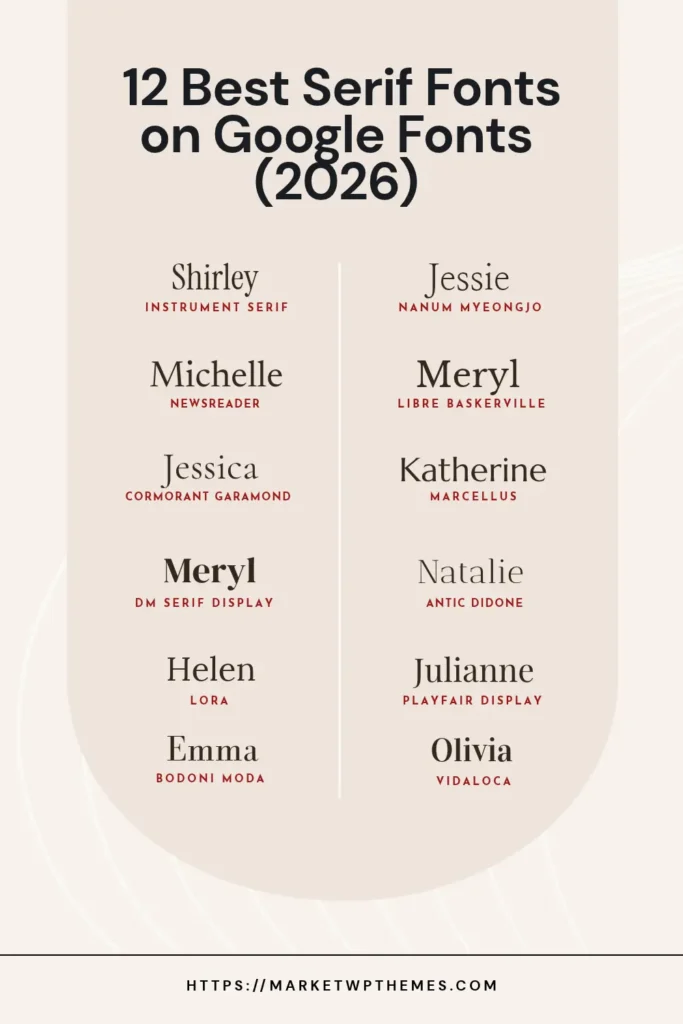
A quick distinction before the list: a display serif is made to be read large, in a headline or a hero section, often with dramatic contrast between thick and thin strokes. A text serif is made to be read small, in paragraphs, so it needs to stay comfortable at 16 or 18px. Mixing the two, a display serif for headings and a text serif for body copy, is usually the right call.
Why Use Google Fonts in the First Place
- Free and open source. Every font on Google Fonts is released under an open-source license (usually the SIL Open Font License). You can use them on client projects, print and merchandise with no license to buy and no usage caps to track.
- A huge, actively maintained library. Google Fonts covers hundreds of serif typefaces alone, from brand-new display faces like Instrument Serif to fonts built for specific scripts such as Nanum Myeongjo for Korean, and the library keeps growing.
- Works everywhere. Google Fonts is not tied to WordPress or any platform: it works the same way on Squarespace, Showit, Shopify or a hand-coded site, which makes it easy to keep typography consistent if a client moves platforms later.
- Variable fonts. Some entries, Fraunces among them, are variable fonts: a single file that smoothly adjusts weight or optical size instead of loading a separate file per style, which keeps the page lighter.
- Battle-tested. These fonts render on an enormous number of websites, so rendering quirks and bugs get found and fixed quickly.
There is one catch worth knowing if the site has European visitors: loading fonts directly from Google’s servers sends visitors’ IP addresses to Google, and a 2022 German court ruling found that doing this without consent breaches GDPR. The fix is simple: serve the font files from your own server instead of Google’s. On WordPress, a plugin such as OMGF (Optimize My Google Fonts) downloads and self-hosts the files automatically, keeping the same fonts without sending visitor data to Google. Squarespace and Showit host their fonts themselves, so this is mainly a WordPress consideration.
Modern display serifs for headlines and hero sections
Instrument Serif
Instrument Serif has been everywhere on new landing pages over the last year, and it is easy to see why: tall, condensed letterforms with a slightly quirky italic, built to be set large. Google Fonts describes it as “a condensed display font… intended for use at large sizes.” It only comes in one weight, so it works best as a statement headline, not as a font you lean on for the whole page. See it on Google Fonts.
DM Serif Display
A high-contrast, editorial-feeling serif designed by Colophon Foundry. Google Fonts calls it “a high-contrast transitional face” with “delicate serifs and fine detailing… shaped for use in super-sized poster setting.” It pairs naturally with its sibling below for a complete type system. See it on Google Fonts.
Playfair Display
One of the most established serif headline fonts on Google Fonts, and still a safe, elegant choice years after it first became popular. It is a transitional design with sharp, high-contrast strokes, inspired by the European typefaces from the late 1700s, when pointed steel pens replaced broad nib quills. Good for weddings, editorial sites and anything that wants to feel a little formal. See it on Google Fonts.
Didone serifs: sharp contrast, editorial feel
Vidaloka
A Didone display serif with a classic, newspaper-like feel. Google Fonts calls it “a Didone display typeface” and, because of its contrast, recommends using it “at 16px or larger,” so it sits firmly in the headline camp rather than body text. A good option when Playfair Display feels too common but the brand still wants that sharp, high-contrast editorial look. See it on Google Fonts.
Antic Didone
A third Didone in the list, and the one that leans hardest into its newspaper roots: Google Fonts says it was “designed for use in the headlines of newspapers and magazines,” as part of the larger Antic Type System. Next to Vidaloka it reads as a bit more condensed and no-nonsense, closer to a masthead than an invitation, which makes it a good fit for a blog that wants an editorial, news-style feel. See it on Google Fonts.
Delicate and classical display serifs
Cormorant Garamond
Part of the larger Cormorant family, a free display type family developed by Christian Thalmann with 45 font files across nine visual styles. It is thinner and more delicate than Playfair Display, closer to a fine printed invitation than a magazine headline, so it works best at larger sizes and in shorter bursts of text. See it on Google Fonts.
Marcellus
A flared serif “inspired by classic Roman inscription letterforms,” with a cool, upright, slightly architectural feel. Google Fonts also offers Marcellus SC, a small-caps companion. It reads as more formal and monumental than Playfair Display, closer to lettering carved in stone than printed on a page, which makes it a good fit for luxury, legal, museum or heritage-brand sites. There is only one weight, so like Instrument Serif it works best for headings rather than body copy. See it on Google Fonts.
Serifs built for reading, not just headlines
DM Serif Text
The companion to DM Serif Display, built with lower contrast so it holds up better at body-text sizes. Google Fonts describes it as a “more robust” option with the same delicate serif details, but better suited to paragraphs. Using both DM Serif Display for headings and DM Serif Text for body copy is a clean way to keep one family doing all the work on a page. See it on Google Fonts.
Lora
Google Fonts describes Lora as “a well-balanced contemporary serif with roots in calligraphy,” and that balance is exactly why it works so well for body text. It has moderate contrast and sturdy letterforms that hold up at small sizes, which makes it one of the safer picks for blog posts and long-form pages. See it on Google Fonts.
Libre Baskerville
A free, web-optimized revival of the classic 1941 American Type Founders Baskerville, adjusted for screens. Google Fonts describes it as “a web font optimized for body text (typically 16px),” which is exactly what it is: a dependable, slightly traditional text serif that reads comfortably in long paragraphs without feeling as soft as Lora. A safe pick if the brand wants to feel established and trustworthy rather than trendy. See it on Google Fonts.
Newsreader
Created by Production Type specifically for “continuous on-screen reading in content-rich environments,” which is a precise way of saying: this is a font built for articles. If the site leans more editorial, a digital magazine, a long blog post, a newsletter archive, Newsreader is worth testing against the default serif. See it on Google Fonts.
Specialized serifs
Nanum Myeongjo
A Korean serif (Myeongjo is the Korean equivalent of a serif style) designed by Sandoll Communications as part of the Nanum family, built specifically for Hangul. If a site needs to support Korean text alongside Latin, this is one of the more polished free options on Google Fonts, and it pairs reasonably well with a Western serif like Lora for a bilingual layout. See it on Google Fonts.
How to Choose
Start from how the font will be used, not how it looks in the specimen. A font that looks striking in a 96px headline, like Instrument Serif or DM Serif Display, can be unreadable at 15px in a paragraph. A font built for reading, like Lora or Newsreader, can look flat and boring blown up to fill a hero section. Most sites end up using two: one display serif for headings, one text serif (or a simple sans-serif) for body copy.
All of these are free to use for personal and commercial projects under their open-source licenses, and every one loads directly from Google Fonts or can be self-hosted for better performance. If you are building on WordPress, our guide to Important Things To Do After Installing WordPress covers the basics of setting a site up properly, and if you want ready-made designs that already pair fonts well, browse our Squarespace templates or WordPress themes.
Looking for premium, independently designed serif fonts instead of free ones? See our companion guide on serif fonts from Creative Market.
Leave a Reply